
How to resolve the Picus NxT Error message: “Failed to find zero position. Press OK to retry.”
Step 1: Try the Simple Fix
- Press OK on the device
- Wait to see if the Picus NxT error clears
- These types of errors are common and often resolve with this step.
Step 2: Perform a Reset (If Step 1 Doesn’t Work)
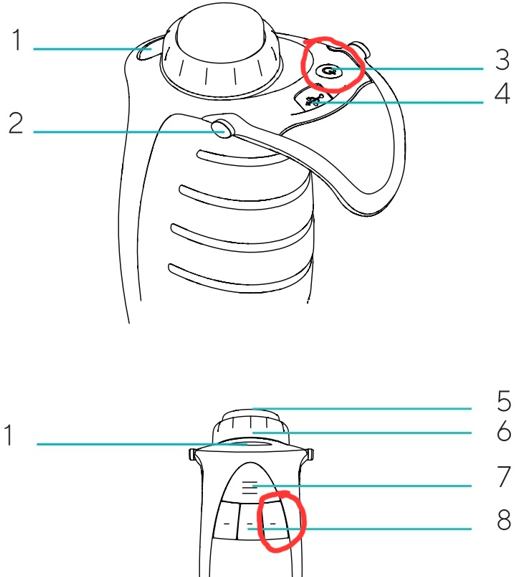
- Picus & Picus NxT User Manual – Section 8.1, Page 36
- Locate the buttons circled in red
- Press and hold both buttons for about 10 seconds
- The pipette should power off automatically
- Turn the pipette back on
- Check if the error is resolved
Step 3: If the Picus NxT Error Persists
In this case, you may need to send the device a service technician for repair. The issue could be mechanical, possibly with the motor or lower assembly.
Disclaimer: Any action you take using the information on this website is strictly at your own risk. The information herein does not constitute professional advice and is general in nature. We make no warranty that this information will meet your requirements, be safe, accurate, or error-free. Pipette Supplies, Inc. is not responsible for any errors or omissions, any results obtained from the use of this information, or any loss or damage arising out of the use of this information. This site is for educational purposes only.
Fair Use: Copyright Disclaimer under section 107 of the Copyright Act of 1976, allows for “fair use” for purposes such as comments, criticism, teaching, scholarship, news reporting, and research.
Fair use is permitted by copyright statute that might otherwise be infringing.